HTML to PDF: Using RenderX XEP to Generate PDF Output in Web Applications |
||||
|
RenderX XEP processor can be used to convert HTML (XHTML) to PDF, PostScript, or any other output format supported by XEP. Depending on the Web application design, Web server setup and the chosen technology and the project's requirements, PDF can be produced sequentially (X)HTML -> XSL-FO -> PDF, or directly from the source data (database or XML, for example) which is used to generate Web pages. |
||||
HTML to PDF: General Concept |
||||
|
EnMasse: Scalability and Connectivity Integration & Connectivity Kit
|
 |
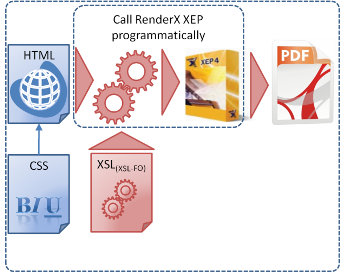
Many Web applications need to generate fixed-layout output - most likely in the PDF format - for various reasons: printing, archival, faxing, etc. Fixed-layout outputs have their advantages over HTML, which is intended to mark up pages that should be viewed on screen. You may choose to use them, because you may need better control over the layout or do not want the output to be changed. You may also decide to standardize on PDF, for example, because this format can be easily converted to some other form - TIFF for faxing, for example. XEP - RenderX's XSL-FO formatter - takes either XSL-FO or an XML/XSLT pair as input and produces documents in the PDF, PostScript, and other formats. You can call XEP programmatically from any Web server technology - Java, ASP.NET, Ruby, Python, etc. Because XML and HTML have a lot in common, HTML can be easily converted to XSL-FO through some kind of transformation. One of the most common ways to perform such transformation is to apply XSLT. A well-formed HTML (XHTML) file is essentially an XML file. So if you choose to use an XSL transformation process, you can simply specify the HTML and XSLT files that you would like to be transformed to PDF. Another way to produce XSL-FO is to use the CSSToXSLFO free utility. |
||
Sequential Method: HTML (XHTML) -> XSL-FO -> PDF |
||||
|
|
|
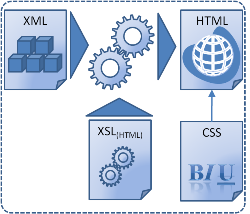
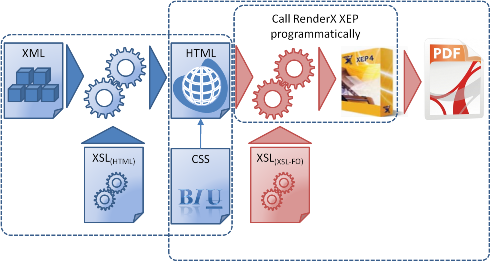
Many Web applications generate Web pages from some data source, such as a database or XML.
In some cases, you may need to produce PDF pages that closely match the HTML output. In this case you may choose to use RenderX formatting solutions in a sequence as the diagram below shows.
|
||
Parallel Method: XML -> HTML (XHTML) and XML -> PDF |
||||
|
|
|
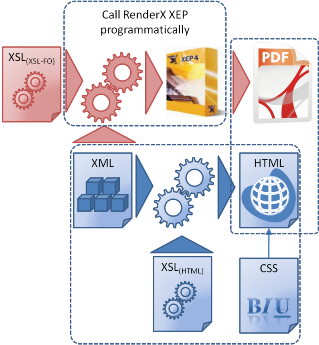
If your Web application uses some data source - such as XML or database - to generate HTML output, you may consider generating PDFs directly from the source data. This approach can be beneficial, if you would like to have the PDF output to differ in style from the HTML version.
|
||
|
|
|
RenderX VisualXSL – a graphical XML report editor – can be used for visual development of XSLTs which can be used for PDF generation with XEP/XEPWin. |
||